微前端实践:基于 Module Federation 的实现
微前端通信模型
在理想情况下,所有的微前端都是自给自足的,因此微前端不需要相互通信。但现实情况下,有时候需要把用户的交互信息通知给其他微前端,尤其是同一个页面使用多个微前端时。
在同一个页面使用多个微前端的场景中,我们可以通过EventBus事件总线的模型进行多个微前端之间的通信。一个微前端发送的事件会通知到每个微前端,如果某个微前端对接收到的事件感兴趣,那么它只要进行相关处理即可。
另外一个方案可以使用自定义事件,例如通过 postMessage 实现。除此之外,还可以采用 cookie、storage 等方式。
除了上面的通信机制,还可以采用 URL 参数的方式进行通信,这也是最原始的通信方式。
微前端路由
在客户端进行微前端的组合,需要处理路由相关信息。路由有两种类型:
- 微前端容器(App shell)处理的全局路由,负责微前端之间切换的路由。
- 微前端内部的本地路由,负责内部逻辑处理。
Module Federation 实现微前端
Module Federation 允许 JS 应用程序动态运行来自另一个捆绑包的代码,或是在客户端和服务器上构建代码。Module Federation 有两个重要的概念:
- host:在运行时加载共享库、微前端或组件的容器
- remote:要在本地加载的 JS 代码包
其中 host 对应微前端的 App Shell(容器),remote 对应各个微前端。
在 Module Federation 实现中,webpack 提供了两个插件:ContainerPlugin 和 ContainerReferencePlugin。 第一个负责创建容器,以异步加载和同步运行模块,第二个负责将特定引用添加到容器中,并注入初始包中的代码。
App shell 的功能实现
App shell 的核心职责包括:
- 避免 App shell 中的域泄露
- 实现微前端之间的全局路由
- 确保正确加载和卸载微前端
- 在一个或多个 JS 代码块中生成跨子域的依赖项
首先初始化 App shell 项目:
pnpm init复制如下代码到 package.json:
{
  "name": "appshell",
  "version": "1.0.0",
  "description": "Micro Frontends App Shell",
  "main": "index.js",
  "scripts": {
    "start": "webpack serve",
    "build": "webpack --mode production"
  },
  "keywords": [],
  "author": "",
  "license": "ISC",
  "packageManager": "pnpm@10.20.0",
  "dependencies": {
    "react": "^18.3.1",
    "react-dom": "^18.3.1",
    "react-router-dom": "^6.26.0"
  },
  "devDependencies": {
    "@babel/core": "^7.24.0",
    "@babel/preset-react": "^7.24.0",
    "babel-loader": "^9.1.3",
    "html-webpack-plugin": "^5.6.0",
    "webpack": "^5.91.0",
    "webpack-cli": "^5.1.4",
    "webpack-dev-server": "^4.15.1"
  }
}创建以下文件:src/index.js、src/bootstrap.js、src/app.js、webpack.config.js(具体代码可参考 GitHub 仓库)
其中 app shell 的 webpack 配置如下(需要从 webpack 导入 ModuleFederationPlugin):
const ModuleFederationPlugin = require('webpack/lib/container/ModuleFederationPlugin');

// ... 其他 webpack 配置 ...

new ModuleFederationPlugin({
      name: 'AppShell',
      remotes: {
        ProductsApp: 'Products@http://localhost:8080/remoteEntry.js',
        DashboardApp: 'Dashboard@http://localhost:8082/remoteEntry.js',
      },
      shared: {
        react: {
          singleton: true,
          requiredVersion: '^18.3.1',
        },
        'react-dom': {
          singleton: true,
          requiredVersion: '^18.3.1',
        },
        'react-router-dom': {
          singleton: true,
          requiredVersion: '^6.0.0',
        },
      },
    })
remotes 配置微前端的入口,格式为:remoteAlias: ModuleFederationInfo。
各个微前端的 webpack 配置如下:
type ModuleFederationInfo = string;
interface PluginRemoteOptions {
  [remoteAlias: string]: ModuleFederationInfo;
}
remoteAlias 是用户实际引用的名称,可自行配置。例如设置为 ProductsApp,在代码中应该通过如下语句引入:import ProductsApp from 'Products/App'。
ModuleFederationInfo 由 ModuleFederation name + @ + ModuleFederation entry 组成,ModuleFederation name 是生产者设置的名称。这里的生产者是 remote 设置的名称。例如下面 products 中的配置,决定了名称为 Products。
const ModuleFederationPlugin = require('webpack/lib/container/ModuleFederationPlugin');

// ... 其他 webpack 配置 ...

new ModuleFederationPlugin({
      name: 'Products',
      filename: 'remoteEntry.js',
      exposes: {
        './App': './src/App',
      },
      shared: {
        react: {
          singleton: true,
          requiredVersion: '^18.3.1',
        },
        'react-dom': {
          singleton: true,
          requiredVersion: '^18.3.1',
        },
      },
    })
启动各个服务
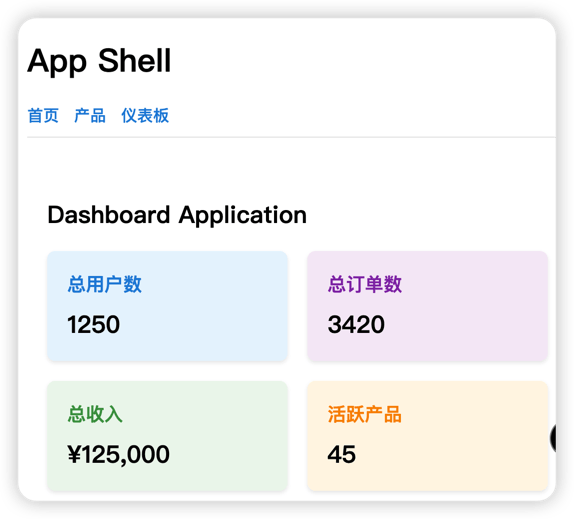
先启动各个微前端服务,之后启动 app shell,访问 app shell 可以看到如下界面:
生产环境构建
直接进行 build,访问 app shell 的页面,会出现资源加载失败的情况。
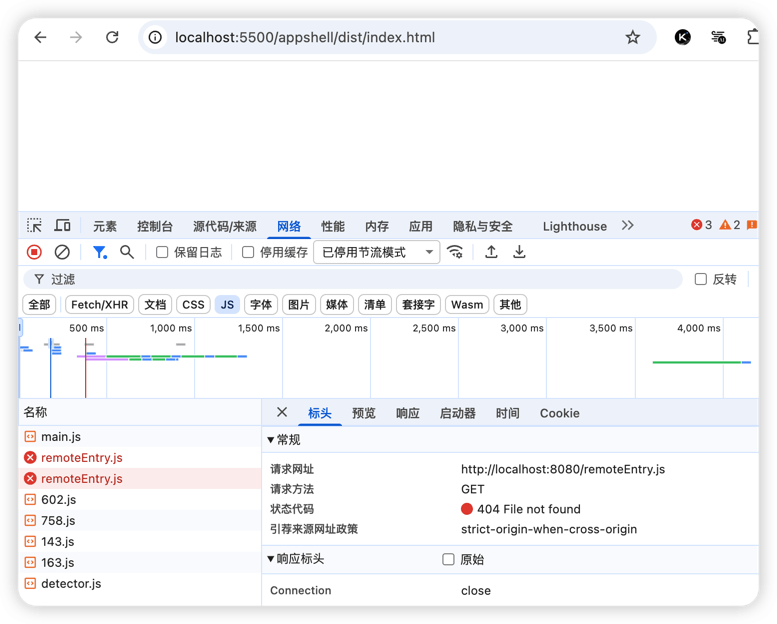
为了解决这个问题,在 app shell 的 webpack 配置中增加如下配置:
// 从环境变量获取远程模块的 URL,如果没有设置则使用默认值
const PRODUCTS_URL = process.env.PRODUCTS_URL || 'http://localhost:8080';
const DASHBOARD_URL = process.env.DASHBOARD_URL || 'http://localhost:8082';

new ModuleFederationPlugin({
    name: 'AppShell',
    remotes: {
        ProductsApp: `Products@${PRODUCTS_URL}/remoteEntry.js`,
        DashboardApp: `Dashboard@${DASHBOARD_URL}/remoteEntry.js`,
    },
    shared: {
        react: {
            singleton: true,
            requiredVersion: '^18.3.1',
        },
        'react-dom': {
            singleton: true,
            requiredVersion: '^18.3.1',
        },
        'react-router-dom': {
            singleton: true,
            requiredVersion: '^6.0.0',
        },
    },
})